In total, 16 international designers and artists created pieces that respond to the interiors of the building.
The exhibition introduces new art pieces and objects into the house and garden
Some responded by sourcing materials from the property itself, while others focussed on themes and ideas taken from decorations within the interiors.
“The designers of the exhibition have responded to Chatsworth in all sorts of fascinating ways,” said co-curator of the exhibition Glenn Adamson.
“Throughout you really see this kind of conversation between the present and the past.”
Jay Sae Jung Oh designed a throne using musical instruments
The exhibition continues Chatsworth House’s 500-year-long history of working with leading artists and designers and collecting an extensive collection of art and objects.
“An artist’s new work can create a new way of looking at these spaces,” said Chatsworth House Trust director Jane Marriott.
“It can capture their imaginations and hopefully inspire them to explore Chatsworth in a different light.”
Toogood’s monolithic furniture creates a pensive space within the exhibition
British designer Toogood took over Chatsworth’s chapel and adjoining Oak Room. As a nod to the historical use of the space as a place of worship and gathering, she created an installation of monolithic furniture made from bronze and stone.
The sculptural forms were designed to evoke ecclesiastical structures and to reflect the local landscape.
“These objects give a sense of meditative calm, a sense of massiveness or monumentality that feels appropriate to the space,” Adamson said.
Dutch designer Joris Laarman designed a series of benches for the exhibition
Two stone benches by Dutch designer Joris Laarman made from locally sourced gritstone , which was the material used to build the house itself, were placed in Chatsworth House’s gardens.
The surfaces of the benches were carved with undulating patterns in which moss and lichen have been planted and will continue to grow over time.
Other objects in the exhibition include a throne-like seat wrapped in leather made from musical instruments by Jay Sae Jung Oh, a fibrous cabinet designed by Fernando Laposse, and sinuous steam-wood sculptures by Irish furniture maker Joseph Walsh.
Laposse’s fluffy cabinet is made from agave plant fibres
Another section of the exhibition, which occupy Chatsworth’s Sculpture Gallery built in the early 19th century, features pieces by British designer Samuel Ross.
Ross’s pieces were designed to echo the surrounding sculptures, mimicking their form to invite viewers to imagine the body that would recline on them. The designer has used a material palette of stone and marble to further reflect the sculptures within the gallery.
Chatsworth’s collection contains art and design pieces spanning 4,000 years
“It’s a kind of collision of past and present, of the artisanal with the technological, the classical with the industrial,” Adamson said.
“It’s a great example of how the show in general tries to talk across generations, across centuries.”
The US housing market has slowed dramatically over the past year, RH CEO Gary Friedman said.
Soaring interest rates have hit housing demand, and the banking fiasco is a fresh blow, he said.
Friedman said the outlook is less clear now than in 2008, and he urged the Fed not to tank the economy.
Thanks for signing up!
Access your favorite topics in a personalized feed while you’re on the go.
The US housing market is suffering a major downturn as historic inflation, surging interest rates,and banking-sector turmoil rattle the wider economy, RH CEO Gary Friedman has warned.
“It’s not rocket science to know this is a really bad time,” he said on the luxury-furniture retailer’s fourth-quarter earnings call, according to a transcript provided by AlphaSense/Sentieo.
“The fact is, we’ve been in a massive housing recession for the past year,” Friedman continued, adding that “accelerating weakness” in the sector could weigh on his company’s revenue and profits for several quarters.
The executive pointed to a recent Redfin report showing that luxury home sales slumped 45% year-on-year in the three months ending January 31, while non-luxury home sales dropped by a record 38%.
Moreover, he flagged a Mortgage Bankers Association survey that found home-purchase applications plunged 42% year-on-year in the week ending March 3, and refinancing activity dropped by 76%.
“The data points to business in our sector likely getting worse before it gets better,” Friedman said, pointing to pressure on stocks and banks as additional headwinds.
The RH boss said he was worried about three US banks folding earlier this month. He also expressed concern that a consortium of Wall Street banks deposited $30 billion in First Republic to shore up the embattled lender’s balance sheet and stave off another bank run.
“I’ve been on the planet for long enough to know this is not normal, and this is dangerous,” he said.
Friedman warned the economic outlook is more uncertain today than in 2008 and 2009, after the housing bubble burst and the Great Recession took hold. He noted there wasn’t an inflation problem or as much political unrest back then.
The business leader also urged the Federal Reserve — which has hiked interest rates from nearly zero to upwards of 4.75% over the past year to crush inflation — not to strangle the economy.
Higher rates can ease upward pressure on prices by making borrowing more costly and encouraging saving over spending. But they can also erode demand, pulling down asset prices and raising the risk of a recession.
“Just land the plane on the other side, whether it’s hard, whether it’s bumpy,” Friedman said. “Just don’t completely crash. A complete crash would look like the ’70s and the ’80s. That will take over a decade to recover from.”
Several experts have sounded the alarm on the housing market and economy. David Rosenberg, the president of Rosenberg Research, told Insider in February that he expects house prices to slump by 15% to 20%, and a recession to take hold.
Meanwhile, Wharton professor Jeremy Siegel cautioned earlier this month that house prices could fall 15% from their peak, and warned this week that the risk of the recession has increased.
If you’re looking for a fun way to include your dog in your Easter festivities, why not make him his own basket? Tune in to your inner Easter Bunny and fill the basket with cute, Easter-themed items your dog will love.
Because typical plastic Easter grass can be dangerous for your dog, stick with raffia or make your own by cutting green craft paper into strips or running it through a paper shredder.
Chocolate and candy clearly aren’t an option because they are toxic to dogs but here are some fun Easter dog treat alternatives:
Don’t forget dog toys! Give your dog something fun to play with on the big day. We love these Easter-themed toy options:
And for the dog who has everything – but could always use a little more – here are some fun and festive dog apparel and accessories:
Podcasting is a great way to introduce your voice to thousands of people around the world. However, just using a microphone is not sufficient to create highly engaged podcasts, you need to have the proper types of equipment to make it effective. This equipment includes a microphone, headphones, and the best laptop for podcasting to get your voice heard by lots of people.
If you’re seriously involved in podcasting and looking for a laptop, then you should not compromise the quality of your podcasting. Here, we have listed some of the good laptops for recording and podcasting available in the market right now.
Basically, a laptop is not compulsory for podcasting but to edit your recordings, you need to have a laptop. All the laptops listed below are suitable to run popular podcasting software such as Garageband, Audacity, WavePad Audio Editor, and Adobe Audition.
Minimum Requirements for Buying a laptop for Podcasting
Processor – The laptop should have a minimum 2.4GHz processor.
RAM – minimum 8GB RAM (a greater RAM size is recommended to provide better speed)
Storage – A minimum of 128GB of SSD space (additional storage required for storing the data and different files)
Display – The laptop must have a display of a minimum of 1920 x 1080 resolution.
Connectivity – Should have all the essential connectivity ports including Wi-Fi / Ethernet to use the internet.
Based on these requirements, we have listed some of the best laptops for editing your podcasts. For now, let’s start with the cheapest laptop for podcasting followed by the premium laptops for audio production.
Top 7 Best Laptops for Podcasting
1. Acer Aspire 5 – Best Affordable laptop
If you’re running on a tight budget and looking for a reliable and high-end laptop for podcasting then you must consider Acer Aspire 5 in your choice list. This laptop is powered by the 11th generation Intel Core i5 processor with a 1.6GHz clock frequency which performs 2x times better than the old processor. It comes with 8GB of DDR4 RAM and 256GB of fast solid-state drive which can be useful if you are into multitasking while doing podcasting.
If we discuss its display, the laptop offers a 15-inch full HD display with vibrant colors and wide viewing angles which is ideal for watching HD movies and images. Apart from that, the laptop is featured with Intel Iris Xe graphics, which is adequate for playing casual gaming.
The laptop has a full-size backlit keyboard which allows you to work in a low-light environment. The Aspire 5 doesn’t let down when connectivity is concerned. It offers Type-C, USB 3.1, USB 2.0, Ethernet, and HDMI slots, followed by Wi-Fi 6 and Bluetooth 5.0 for a fast, reliable connection. Overall, Acer Aspire 5 is the best budget laptop for podcasting you can buy right now.
Hardware Specifications of Acer Aspire 5 11th Gen Notebook
Processor
11th Generation Intel Core i5-1135G7 Processor (Up to 4.2GHz)
RAM
8GB DDR4
Storage
256GB NVMe SSD
Display
15.6″ FHD IPS (1920 x 1080) WLED-backlit Display
Graphics
Intel Iris Xe Graphics
Operating System
Windows 10 Home
Battery Life
Up to 8.5 hours
Weight
3.64 lbs
Pros
Fingerprint reader
Long-lasting battery life
Reliable Intel Wireless Wi-Fi 6
Backlit keyboard
Cons
Not great for heavy rendering tasks
No SD card slot
2. Apple MacBook Pro 13 – Best Choice
Apple MacBook Pro is an ideal notebook for performing most of the most demanding tasks such as video recording, music production, and podcasting. If you have a sufficient budget, we’d highly recommend you go for MacBook Pro. This 13-inch model is the latest release from Apple with a powerful M1 chip that performs several times better than the older versions.
The laptop runs on a System on Chip (SoC) Apple’s M1 chip paired with 16GB of LPDDR3 RAM and 256GB of the solid-state drive which makes it sufficient for podcasting to run multiple programs simultaneously.
The laptop offered a powerful 8-core GPU integrated on Apple’s M1 chip with up to 5x faster graphics for graphics-intensive apps and games. MacBook Pro 13 comes with a brilliant finish and lightweight design that can be carried easily anywhere you like.
For connectivity, you’ll get two Thunderbolt / USB 4 ports that may not be ideal for some people. You can use a USB hub if you want to use some ports other than Type-C ports. The laptop has a 13.3-inch full HD IPS Retina display which is ideal for recording and editing podcasts. All in all, if you have a large budget, then the Apple MacBook Pro 13 would be the best for your podcasting work.
Hardware Specifications of Apple 13″ MacBook Pro – M1 Chip
Processor
System on Chip (SoC) Apple M1 chip; 8-core CPU
RAM
16GB 2133MHz LPDDR3
Storage
256GB SSD
Display
13.3″ FHD LED-backlit Retina (2560×1600) Display
Graphics
Apple 8-core GPU
Operating System
macOS BigSur
Battery Life
Up to 17-hours
Weight
3.0 lbs
Pros
Excellent Retina display
Superb battery backup
Great performance
Comfortable keyboard
Cons
Has limited ports
Miserable webcam
3. HP Spectre x360 15t – Best Convertible
HP Spectre is a great companion for Windows users and offers high-end configurations like Apple’s MacBook Pro. Though the laptop is expensive still it is cheaper than MacBook Pro and powerful enough to handle those performance-hungry applications.
This 15-inch notebook is powered by the latest 10th-generation Intel Core i7 processor paired with 16GB of RAM and a massive 1TB of solid-state drive that ensures your podcasting software runs smoothly. The laptop comes with brushed aluminum chassis which gives it a premium feel and features an ultra-portable design.
With its 15-inch 4K display, you can enjoy high-resolution movies and videos with impressive color and clarity. The laptop offers a full-size backlit keyboard that allows you to type in dim or dark locations easily. You’ll get one USB Type-C, one USB 3.1 port, and a Thunderbolt port for connecting external drives.
The laptop has a 180-degree hinge feature making it more convenient to use in different modes while podcasting. Overall, the HP Spectre x360 is one of the best laptops for podcasting that meet all types of needs to run the software for audio production.
Hardware Specifications of HP Spectre x360 15t 2-in-1 Laptop
Processor
10th Generation Intel Quad-Core i7-10750H Processor (Up to 5.0GHz)
RAM
16GB DDR4
Storage
1TB PCI NVMe M.2 SSD
Display
15.6″ 4K UHD WLED-backlit (3840 x 2160) Touchscreen Display
Graphics
NVIDIA GeForce GTX 1650 Ti with Q-Max Graphics 4GB GDDR5
Operating System
Windows 10 Home 64
Battery Life
Up to 13-hours
Weight
4.83 lbs
Pros
Excellent performance
Camera Shutter Key
4K Touch IPS display
Integrated fingerprint reader
Cons
Touchpad needs more friction
Average battery life
4. ASUS VivoBook K571GT
Asus Vivobook K571 is another affordable yet powerful laptop for podcasting that can fulfill all your recording needs. This premium and portable laptop feature a dual-fan cooling system that ensures you stay comfortable even after long hours of use. It sports a brushed aluminum framework with black chassis and weighs only 4.3 lbs which makes it perfectly suitable for travelers. The laptop comes with a 15-inch full HD display that provides richer, deeper, and more accurate colors for all types of content.
If we talk about its performance, the laptop features the powerful Intel Core i7 10th generation processor, 16GB of RAM, and 256GB of solid-state drive with 1TB of hard disk, making it suitable for effortless multitasking. The laptop has a full-size backlit keyboard to help you stay productive even in a dark environment.
With Nvidia GeForce GTX 1650, this laptop is capable to deliver flawless visuals while gaming and watching videos. The connectivity ports include one USB 3.0 port, two standard USB 2.0 ports, and HDMI for connecting to various peripherals and devices.
Hardware Specifications of ASUS VivoBook K571 Ultrabook
Processor
10th Generation Intel Core i7-10750H Processor (Turbo up to 4.5GHz)
HP Pavilion 15-dy2021nr is the best cheap laptop for podcasting that offers many powerful configurations at an affordable price. The laptop comes with a 15-inch full HD display, an aluminum body, and a sleek finish that works perfectly for audio production. The laptop is powered by the Intel Core i5 processor, 8GB of RAM, and 256GB of SSD storage which makes it powerful enough to run most of the podcasting software without stalling or giving any issues.
Apart from that, the laptop boasts Intel Integrated graphics that gives outstanding performance for podcasting work as well as for casual gaming. The laptop weighs only 3.7 pounds and features a superb battery with a life span of 7.5-hours considering all the apps and software you’ll be running for an entire day.
Furthermore, the laptop offers incredible ports including USB Type-C, two USB Type-A, HDMI, a media card reader, audio in, etc. The overall performance of HP Pavilion 15-dy2021nr is quite impressive at an affordable price.
Hardware Specifications of HP 15-dy2021nr Notebook
15.6” Full HD WLED-backlit (1920 x 1080) anti-glare Display
Graphics
Intel UHD Graphics 620
Operating System
Windows 10 Home
Battery Life
Up to 7 hours and 15 minutes
Weight
3.75 lbs
Pros
Latest Intel processor
Ample connectivity ports
Portable design
SD card reader
Cons
No backlit keyboard
Average battery life
6. Asus ZenBook 14 UX435E – Best Ultraportable
The Asus Zenbook UX435E is another premium notebook from Asus in our list of best podcasting laptops. This 14-inch laptop offers a little bit of everything and high-end hardware specifications that one needs to make the best out of podcasting. The laptop is featured with an Intel Core i7 11th gen processor paired with 16GB of RAM and 512GB of solid-state drive to keep your files and programs running smoothly.
As far as graphics are concerned, the laptop is backed by Nvidia GeForce MX450 graphics – powerful enough to handle most of the demanding tasks efficiently. Besides, the laptop comes with a 63Wh lithium-polymer battery to deliver up to 16 hours of life and it can charge up to 60% in just 49 minutes. Furthermore, the ZenBook 14 features a 5.65-inch interactive touchscreen trackpad to fulfill the need for multitasking.
ZenBook 14 features a full complement of I/O ports, with two Thunderbolt 4 USB-C ports that support fast charging, a USB 3.2 port, a full-size HDMI port, and a 3.5mm headset jack. This ultrabook includes a 14-inch full HD nano-edge display with a resolution of 1920×1080 to offer wide-viewing angles and 100% sRGB color gamut. The bottom line, the Asus ZenBook UX435E is the best mid-range laptop for podcasting and audio production.
Hardware Specifications of Asus ZenBook 14 UX435E
Processor
11th-generation Intel Core i7-1165G7 Processor, Up to 5.0GHz
RAM
16GB DDR4
Storage
512GB SSD
Display
14″ FHD LED-backlit (1920 x 1080) 4-way NanoEdge bezel Display
The Microsoft Surface Pro 7 is the latest release of the Surface Pro series notebooks and it is a true competitor of MacBook Pro in terms of performance. With just 1.7 pounds weight, this notebook is ultraportable and powerful that perfectly fit for recording and podcasting work. The Surface Pro is the most versatile notebook that lets you work in different modes at your convenience. On this laptop, you’ll get a 12.3-inch PixelSense touchscreen display with a resolution of 2736×1824 pixels.
The Surface Pro 7 is powered by the latest 10th-generation Intel Core i5 processor with a standard speed of 1.3GHz for effortless multitasking. Apart from it, the laptop comes with 8GB of RAM and a fast 256GB SSD storage which is great for smoother multitasking.
Thanks to its long-lasting battery life, you can stay productive for 10.5 hours without worrying about its charging. Overall, the Microsoft Surface Pro 7 is the perfect balance of power, speed, and aesthetics, therefore, ideal for podcasting and other demanding works.
Hardware Specifications for Microsoft Surface Pro 7
Of course, yes. You can record, edit or upload your podcast on any Windows or Mac laptop. Also, make sure that you have the right podcast recording equipment and audio software to get your job done.
How much RAM do I need for podcasting?
For an average user, 8GB RAM is enough to meet the system requirements and can run most of the editing software seamlessly. However, if you run high-end graphics software or games on your laptop, then 16GB of RAM would be better.
Is a Chromebook good for podcasting?
No, we don’t recommend buying a Chromebook for podcasting. They may come with an affordable price range but lack good audio editing software and other support. However, there is some significant podcasting app such as Spreaker Studio which is fully compatible and designed specifically to work with Chrome OS.
Which laptop brand is best?
There are many popular brands such as Dell, HP, Acer, Lenovo, Microsoft, etc. that offer many high-end laptops to work on podcasting. Well, our topmost choice is the new Apple MacBook Pro which is great from almost all perspectives. The above-mentioned list consists of high-performing machines that are also great for your budget.
Conclusion
So these are the best laptops for podcasting you can choose based on your requirements and budget. If you’re into a professional podcasting business, we would suggest you invest in a good laptop so you get the best value for your money.
We hope this guide will help you find the right laptop for your work. If you have any queries or suggestions about this buying guide, let us know in the comment section below.
This year has begun badly for rescue dogs, particularly large-breed rescues.
“Overcrowded animal shelters are turning away owners wanting to surrender their dogs because there is no room,” says Maria Dales, founder and director of California’s German Shepherd Rescue of Orange County. “With nowhere to take their unwanted dogs, owners seek the help of rescue groups; when rescues can’t help, there are no options left. We can’t ‘rescue’ ourselves out of this situation.”
The best thing you can do when feeling down about the situation is to make a change. Julie Castle, CEO at leading animal welfare organization Best Friends Animal Society, shares the four ways you can help that have the most positive impact on shelter animals.
What you can do to help rescue dogs in 2023
Helping a local overcrowded animal shelter doesn’t always mean adoption.
Here are 4 ways to help your local animal shelter:
Foster a dog. Fostering dogs can alleviate the strain on shelters and rescue groups helping them. By freeing space in a program, you’re allowing another animal to be saved, reducing the need for staffing resources, and helping to prepare the dog for his next home, Julie says.
Volunteering by walking, feeding and cleaning up after dogs is a great way to help a shelter or rescue, but many shelters and rescue groups need remote volunteers to help with administrative tasks or social media, to name just a few.
Transport drivers, those who move dogs from places of need to places of want, are a big help.
Last, spread the word on social media. Help your local shelter get the word out about the pets they have up for adoption — you never know who’s scrolling your feed, says Julie.
“Contact a local rescue group to find out where your efforts can be of greatest impact — find a group that is making progress and add to their achievements,” says Maria.
How did animal shelters get so crowded?
The COVID-19 pandemic took a great deal from so many, but one silver lining was unprecedented numbers of adopted and fostered dogs in 2020. Some previously overcrowded animal shelters even emptied their kennels for the first time ever, says Julie.
The year 2021 proved more challenging for shelters, with slightly higher intakes, decreased staffing, reduced operations and even fewer adoptions, resulting in overcrowded animal shelters and thousands of pets waiting longer to find homes, Julie says. “The number of dogs and cats killed in U.S. shelters increased for the first time in five years (from 347,000 to 355,000), largely due to historic decreases in pets entering shelters in 2020.”
While we do not yet have the full data set for 2022, we are seeing adoptions not keeping up with intake,” Julie says.
In 2023, nationwide shelters are struggling with higher intakes, while adoptions, fosters and rescues are not keeping pace, Julie explains. This population imbalance means more animals in shelters (particularly dogs), are causing increased strain on shelter staff and the current shelter crisis.
“With most U.S. facilities at or over capacity, dogs at overcrowded animal shelters are more at risk for being killed,” she says.
Do you volunteer at your local shelter? Share you experience with us and ways our readers can help.
Design studio Linehouse has used natural, tactile materials for the interiors of the Coast restaurant in Shanghai for China’s casual dining brand Gaga.
The restaurant is set inside a traditional mid-century Shikumen house – a blend of Western and Chinese architecture – with a renovated interior informed by its Mediterranean menu.
“We aimed to create a deep connection with coastal elements and Mediterranean soul,” said Linehouse co-founder Alex Mok.
Linehouse has completed the Coast restaurant in Shanghai
According to the studio, the restaurant’s aesthetic is one of “refined rusticity” – a contemporary reframing of rough-hewn vernacular styles, that creates a laid-back and tranquil atmosphere.
Throughout the scheme, Linehouse was informed by the idea of coastal terrain, including earthy and fired elements.
Linehouse chose a natural material palette, which in turn informed the colour scheme that flows throughout the interior of the three-storey restaurant.
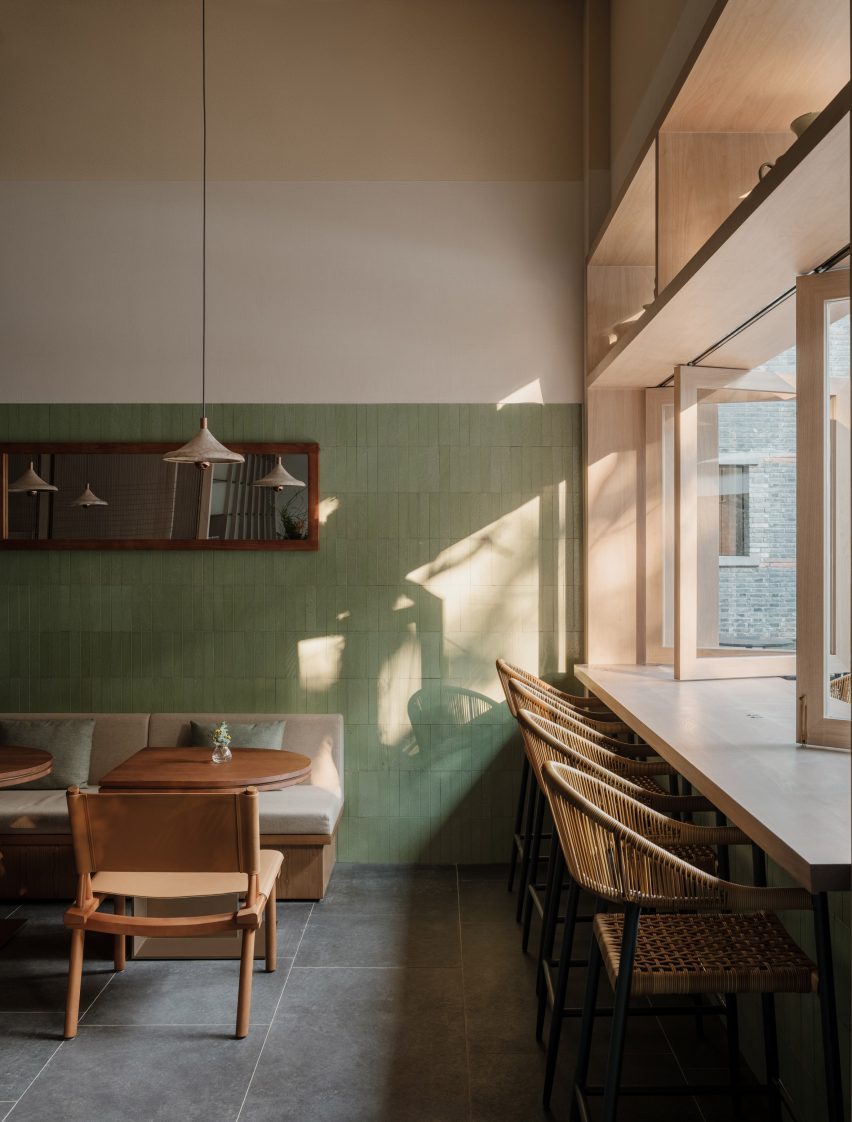
Green-glazed lava stone surrounds the ground-floor cafe and bar
The aim was to take the visitor on a “vertical journey” by giving each of the three floors its own unique identity.
“The colours and materials shift on each floor, telling a different part of the story,” Mok said.
The bar is finished in the same tiles
On the ground floor, where a daytime cafe transitions into an evening bar, green and earthy tones link to the leafy garden beyond. Walls are wrapped in a green-glazed lava stone, with a deliberately hand-made patina, “representing the earth element”.
Custom furniture pieces designed by Linehouse were used throughout the restaurant, while lighting was chosen for its intriguing, sculptural forms from designers including Santa & Cole and Studio KAE.
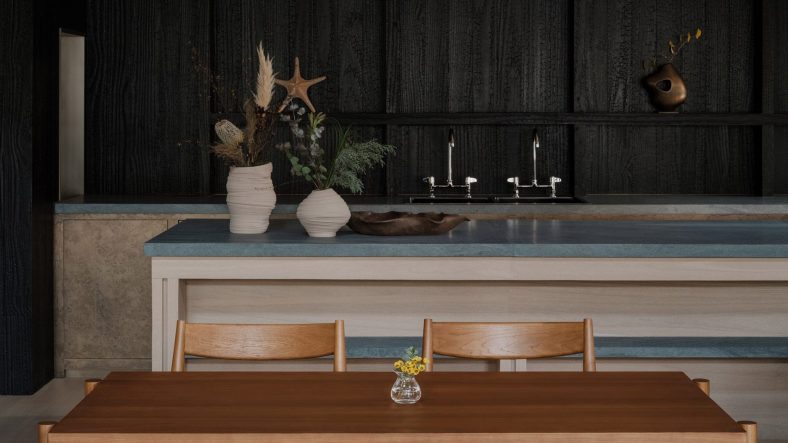
Natural timbers were used for the centrepiece bar counter, while the timber-framed windows open up to the silver-grey of the olive trees outside.
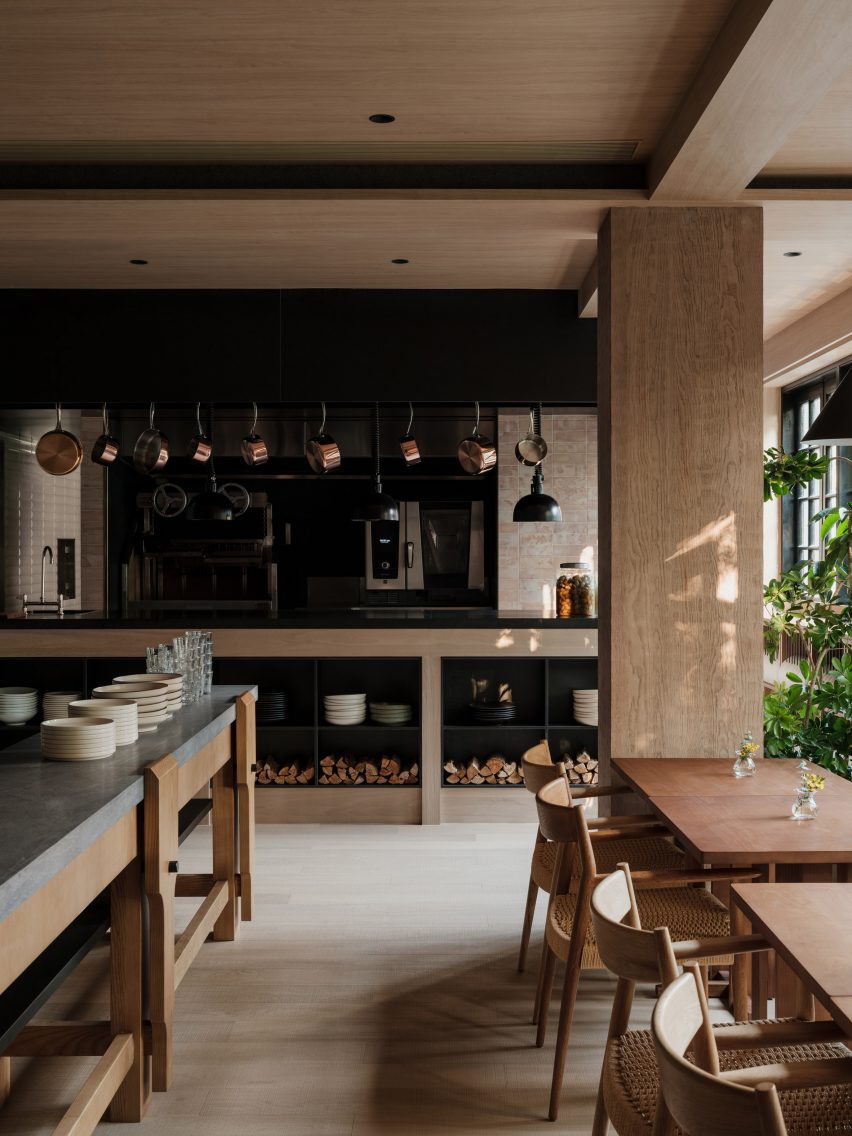
An open-hearth grill features on the first floor
Above this on the first floor is an intimate dining space lined with white-washed stone and timber panelling. Layered oak panels hung horizontally from the ceiling create intimate dining nooks, with taupe-toned banquette sofas and oak dining tables.
The focal point of this room is the parrilla – an open-hearth grill – and a chef’s table.
“The concept of the open parrilla grill captures the quintessence of Mediterranean cuisine,” Mok told Dezeen.
On this level, fire-informed red and brown tones punctuate the space including the tiles that line the kitchen, which were repurposed from used coffee grounds.
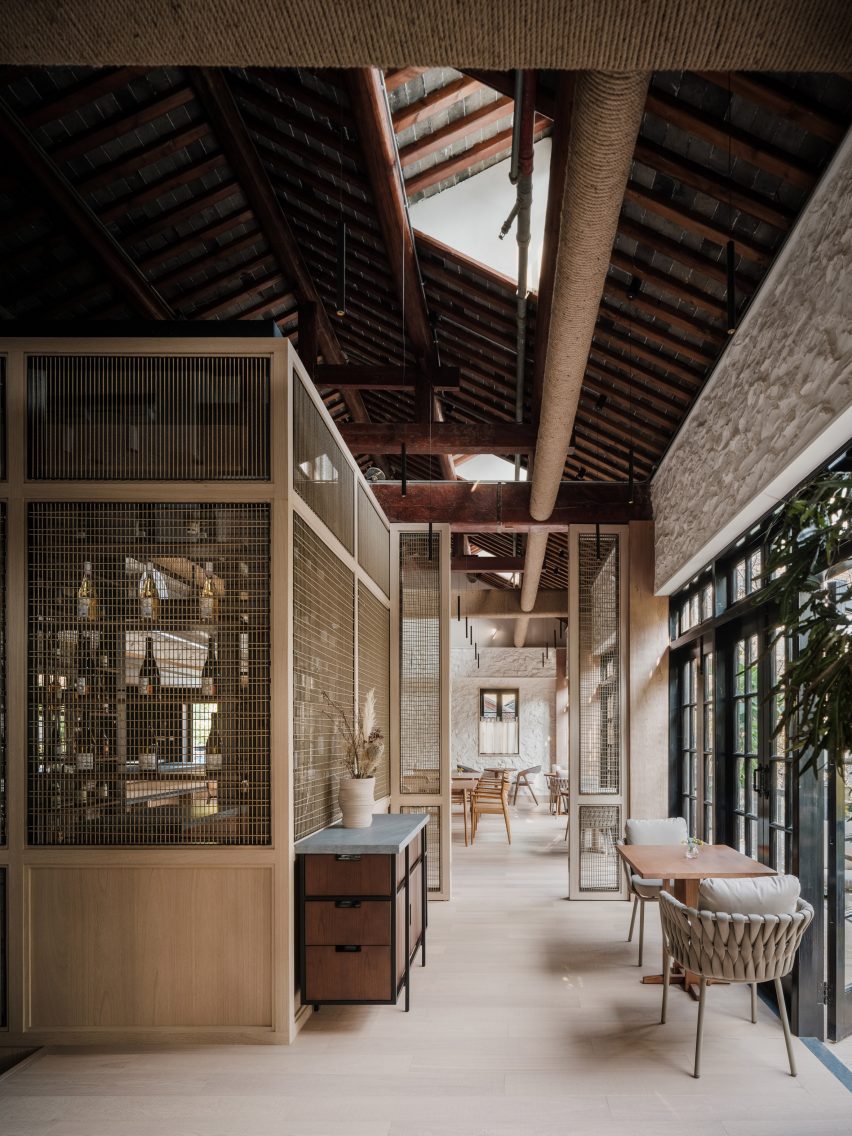
Finally, on the top floor under the exposed timber beams of the pitched roof, Linehouse created a string-wrapped wine room and a lofty private dining space.
Panels of string line the staircase structure
The walls were again clad in white-washed stone. But here, it is contrasted with the intense black of yakisugi, or fire-preserved wood, which serves as a backdrop to a chef’s table.
The space also features a generously-sized balcony, providing views out across this bustling neighbourhood.
Linehouse created a string-wrapped wine room on the top floor
The spaces are linked by a staircase that weaves up through the centre of the building. Its chalky-white outer walls are patterned with a sculptural relief of sea creature exoskeletons, echoed by collections of shells displayed in glass jars nearby.
Panels of string, woven into simple grids, line the staircase structure, allowing natural light to flow into the heart of the building.
“We chose materials that tell the story of the coastal journey, while the exoskeleton wall is a modern representation of the sea,” said Mok.
The top floor also houses a private dining room
Linehouse was founded by Mok and Briar Hickling in 2013 and the duo went on to win emerging interior designer of the year at the 2019 Dezeen Awards.
The photography is by Wen Studio, courtesy of Linehouse.
Dezeen is on WeChat!
Click here to read the Chinese version of this article on Dezeen’s official WeChat account, where we publish daily architecture and design news and projects in Simplified Chinese.
Elon Musk says only verified subscribers will be recommended in Twitter’s timeline.
Voting in polls will also be exclusive to users verified under Twitter Blue.
Last week, Twitter announced plans to remove legacy blue ticks from accounts on April 1
Thanks for signing up!
Access your favorite topics in a personalized feed while you’re on the go.
Elon Musk says from April 15 only Twitter’s paying subscribers will have their posts recommended to other users on its “For You” feed and be allowed to vote in polls. These features are currently available to all users.
Musk tweeted news of this change on Monday, saying that it is “the only realistic way to address advanced AI bot swarms taking over. It is otherwise a hopeless losing battle,” he said.
Musk rolled out his new verification system, including Twitter Blue, shortly after acquiring the platform for $44 billion in late October. This system allowed any user to pay from $8 per month for Twitter’s blue verified checkmark – the blue tick appears next to a user’s name and was previously free to accounts of “public interest” such as those belonging to politicians, celebrities, and journalists.
Since then, Twitter has been introducing features to try and encourage more Twitter Blue sign-ups, including a way to edit tweets and a longer character limit for subscribers. In early February, The Information reported that the new system only had around 300,000 subscribers.
Last week, Twitter announced plans to remove legacy blue ticks from accounts that were verified under Twitter’s old system on April 1 — which is also April Fools Day. Musk has publically voiced his disdain for Twitter’s old verification system on several occasions, once calling it “deeply corrupted.”
Musk, who has consistently said he plans to target bots on Twitter, said that the changes announced on Monday are a way to address issues with bots. However, he also said that bot accounts can also be verified as long as they “follow terms of service” and “don’t impersonate a human.”
In an earlier Twitter post on Monday, the billionaire claimed that paid verification makes it more expensive to run bots and makes them much easier to identify.
“It’s now trivial to spin up 100k human-like bots for less than a penny per account,” he said. “Paid account social media will be the only social media that matters.”
The Tesla CEO also plans to charge businesses $1,000 to keep their blue, gold, or grey checkmarks beyond April 1, a move that has been unpopular with firms. One company founder called the decision “outlandish” and said it made the checkmark “meaningless.”
Last month, Meta CEO Mark Zuckerberg also announced a new subscription service — “Meta Verified” — that will give verified badges to Instagram or Facebook users who pay for the service.
Insider contacted Twitter for comment. The company responded with an automated message that didn’t address the inquiry.
Is my dog watching TV? Many of us have seen our dogs stare at the TV, apparently watching it. Some dogs will bark or even jump at the television, clearly reacting to what they are seeing. But what exactly are they seeing and is it good for them – should I leave the TV on for my dog? Ron Levi, founder of DOGTV, answers your questions about dogs watching TV.
What do dogs see when they watch TV?
Dogs have dichromatic vision, meaning they see shades of blue, yellow and gray only. While they can see images on the TV screen, they cannot comprehend them like humans do. They may be able to recognize familiar people, animals or objects on the screen, but they are not able to understand the meaning or context of the images in the same way we can, explains Ron.
Can dogs recognize other dogs on TV?
Yes, says Ron. Dogs can recognize other dogs on TV by their appearance and body language.
Why do some dogs watch TV and others don’t?
Some dogs are more attracted to the sounds and movement on TV more than others. Dogs who are attracted to TV are either curious, social or reactive. Ron explains that a dog’s breed, age, personality and past experiences play a role in whether they are interested in watching TV. For example, a herding dog may react to quick movement on the screen, while an older dog with less energy may ignore it.
Should I leave the TV on for my dog to watch?
Dogs may find the presence of the TV comforting when their owners are not at home, shares Ron. He explains that the sounds and movement can be comforting to some dogs, but not all. If your dog reacts to the TV – barks or jumps at it – they may be calmer without the TV when you are away. If you do decide to leave your TV on for your dog, do not have the volume too loud.
What do dogs like to watch on TV?
Choose programming that is appropriate for your dog and will not cause him to become distressed or agitated. Ron says programs that are a good choice feature:
animals
familiar people
familiar objects
a lot of movement, such as moving balls or action (for some dogs only)
The programs on DOGTV were created for dogs and feature short clips and educational programs with animals, familiar sights and sounds, Ron adds.
While they can’t understand the plot, your dog might still enjoy some TV time, as long as he stays calm. If you are unsure whether the TV is good for your dog, check with a professional dog trainer or canine behaviorist prior to leaving the TV on for your dog.
Interested in checking out the DOGTV website? Use code DOGSTER1 at checkout for a free one-month trial.
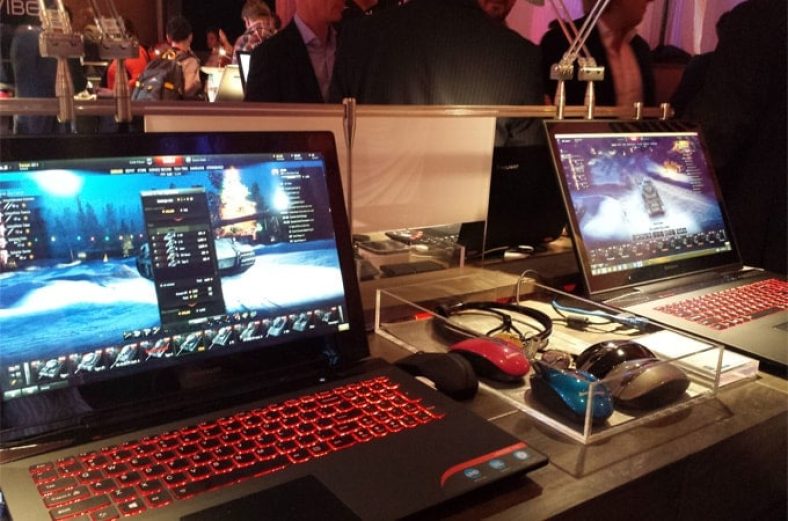
Looking for the best gaming laptops under 2000 dollars? Finding a gaming laptop with top-notch features can be a daunting task sometimes. For gaming freaks who are looking to start out with a quality gaming laptop, it can seem that the prices have no upper limit. As we all know the better the machine, the greater is the gaming experience. A gaming laptop under this price range is different than the other average laptops as they offer high-end gaming features and performance.
At this price range, the laptops have powerful processors, highly effective Graphics, huge hard disk, high-resolution display, and a lot more. So if you’re willing to spend $2000 for a gaming laptop, here we have compiled a list of best gaming laptops under $2000 that is full of fitted with high-grade components and can provide you with easy operations and convenience.
Before proceeding to list, we recommend you to look into some important facts you should consider when looking for the best gaming laptops to buy for under 2000 dollars.
Minimum Requirements for Buying a Gaming Laptop Under $2000
As there are numerous brands available in the market offering the latest gaming laptops so it’s easy to make mistakes on such an expensive investment. Below are some specific requirements that will help you to get the best gaming machine for yourself.
Processor
The processor is an important aspect to look if you’re a hardcore gamer. Some popular games like Dota 2, Fortnite, Overwatch, etc. require a fast processor to speed up the gaming. In this budget range, you should go for Intel Core i7 quad-core processor or higher to boost your gaming experience.
RAM
For intensive gaming sessions, you have to make sure your laptop is able to handle multitasking with ease. For high-end gaming, you should go for at least 16GB of RAM. However, you can upgrade it up to 32GB if needed. The more is RAM, the better will be your gaming experience.
Graphics Card
As you’re going to spend $2000 for a gaming laptop, so you need a powerful graphics card such as the Nvidia RTX series with at least 6GB of dedicated VRAM. The high-end laptop offers RTX 2060 or RTX 2070 however a laptop with GTX 1060 or GTX 1050 is good enough to run most of the intensive games smoothly.
Display
For a gaming laptop, you should consider the minimum 1920×1080 pixels resolution screen. But if you’re not limited to budget, you can go for 4K display laptops to enhance your gaming experience. As far as the display size is concerned, a laptop with a 15-inch or 17-inch screen will be ideal for a gaming laptop.
We hope now you have some idea to choose the best gaming laptop and your search will become easier. To make sure you get the best for your hard-earned money investment, we have done some market research and made this list of high-performance gaming laptops in 2023.
So, without further ado, here we go…
Best Gaming Laptops Under 2000 Dollars
1. Alienware m15 R410th Gen
Alienware is the most popular brand in the gaming laptops industry and one of the popular gaming laptop series from Dell. From performance to display to graphics, it is the perfect all-around option for gamers. If you are going to spend 2000 dollars on a gaming laptop, you should consider Alienware m15 R4 for your final list to buy.
This incredibly thin design gaming laptop comes with Cryo-Tech cooling v3.0 technology with a dedicated vapor chamber, which keeps your laptop cool to the touch and maximizes overall performance. It features a full-size RGB backlit anti-ghosting keyboard with 1.7mm travel with 4-zone RGB N-Key rollover.
The powerful laptop has a 10th Generation Intel Six-Core i7-10870H CPU that is paired with 16GB of RAM. For storage, the Alienware m15 R4 comes with a 512GB fast SSD to ensure you have enough background power to initiate multitasking and enough storage for your games.
The laptop has NVIDIA GeForce RTX 3060 VR Ready graphics with 6GB VRAM for the ultimate gaming experience. Its 15.6-inch full HD IPS display with amazing response time is perfect for an uninterrupted gaming experience and real-life gameplay. Additionally, its thin design makes an ideal gaming laptop under 2000 dollars for those who are looking to get into virtual reality games.
Main Specifications of Dell Alienware m15 R4 VR Ready Gaming Laptop
Processor
10th Generation Intel 6-Core i7-10870H Processor (Up to 5.0GHz)
RAM
16GB DDR4 2666MHz
Storage
512GB PCIe M.2 SSD
Display
15.6″ FHD IPS (1920 x 1080) Anti-Glare Display, 144Hz
Graphics
NVIDIA GeForce RTX 3060 with 6GB dedicated GPU
Operating System
Windows 10 Home
Battery Life
Up to 8-hours
Weight
4.65 lbs
Pros
Sleek and aesthetic design
Powerful GeForce RTX 3070 GPU
Strong performance
Gorgeous 4K OLED display
Highly customizable
Cons
Short battery life
Fans are really very loud
2. Gigabyte AERO 15 OLED KC
Gigabyte brings some powerful gaming machines with high-end features. This GIGABYTE Aero 15 is a 15.6-inch gaming laptop with an attractive and tremendous look. The laptop comes with black aluminum chassis and a Nano-Imprint Lithography triangle, giving it a killer gaming machine look. It is built with a powerful Intel Core i7-10870H processor paired with 16GB RAM and has a storage of 512GB of a solid-state drive.
The Aero 15 features a 15.6-inch, 3840 x 2160-pixel (4K) AMOLED Samsung display with 100% DCI P3 color coverage to give you more accurate colors. The gaming laptop comes with a full-size backlit keyboard with per-key RGB lighting that lets you customize your gaming experience. Gigabyte also features a fingerprint scanner on the touchpad. Furthermore, the webcam on Aero 15 doesn’t sit in the display around, but above the keyboard, which might be a bit annoying for many users.
Nvidia’s brand-new GeForce RTX 3060 Max-Q with the 6GB GDDR6 graphics card can quickly render, high-quality images for the best results in videos and games. The laptop runs on Windows 10 Home and has an efficient dual-fan cooling system to keep your device’s temperature cool. All-in-all the GIGABYTE Aero 15 is a high-performance gaming laptop under $2000 price range.
Main Specifications of GIGABYTE Aero 15Gaming Notebook
Processor
10th Generation Intel Core i7-10870H Processor (Up to 5.0GHz)
RAM
16GB DDR4
Storage
512GB NVMe PCIe SSD
Display
15.6″ 4K/UHD 3840×2160 Samsung AMOLED Display
Graphics
NVIDIA GeForce RTX 3060 Max-Q with 6GB GDDR6
Operating System
Windows 10 Home
Battery Life
Up to 8.5-hours
Weight
4.5 lbs
Pros
Amazing performance
Beautiful 4K OLED display
Per-key RGB keyboard
Gorgeous 4K OLED display
Highly customizable
Cons
Poorly placed webcam
Bass-free speakers
3. Acer Predator Helios 300 Latest Model
Acer has always been something powerful when it comes to gaming laptops. The Acer Predator Helios 300 is the ultimate gaming and multimedia powerhouse powered by an Intel Core i7-10750H 6-Core processor clocked up to 5.0GHz. The Predator Helios 300 easily manages to please in performance with 16GB of RAM and 512GB of a solid-state drive for faster and hassle-free data transfers.
With budget prices and powerful hardware configurations, the laptop is geared for serious gaming and can carry you to victory. Speaking about the display quality, Helios 300 comes with a 15.6-inch full HD IPS display with an incredibly fast 144Hz refresh rate to provide you crisp and clear visuals for high-octane gameplay. The Helios 300 has Nvidia GeForce RTX 3060 graphics with 6GB dedicated GDDR6, that delivers uninterrupted performance for gaming, streaming, and everything in between.
The laptop also comes with a 4-Zone RGB Silver-Lining backlit keyboard for an enhanced gaming experience. It weighs five pounds which is a little bulkier compared to its previous versions. It goes without saying that the Helios 300 is an excellent mid-range gaming laptop aiming to offer the maximum bang for the buck. If you are looking for a hardcore gaming experience under 2000 dollars then Acer Predator Helios 300 would be a great choice.
Main Specifications of Acer Predator Helios 300 Gaming Laptop
Processor
10th Generation Intel Core i7-10750H 6-Core Processor (Up to 5.0GHz)
RAM
16GB DDR4
Storage
512GB NVMe SSD
Display
15.6″ Full HD (1920 x 1080) widescreen IPS display, 144Hz
Graphics
NVIDIA GeForce RTX 3060 with 6GB GDDR6 VRAM
Operating System
Windows 10 Home 64 Bit
Battery Life
Up to 8-hours
Weight
4.85 lbs
Pros
Incredible performance
Comfortable RGB keyboard and trackpad
Good port selection
Partial metal design
Speedy 240Hz display
Cons
Storage could be more
Average battery life
4. Razer Blade 15 Gaming Laptop
The Razer Blade 15 is another well-performing gaming machine on our list of best gaming laptops under 2000 dollars. If we talk about its design, the laptop is designed with green accents and black chassis with a CNC aluminum body frame giving it a stunning look. When it comes to the hardware of the laptop, it offers a very strong set of specifications for the price.
It comes with a 15.6 inches full HD IPS 144Hz display that provides an immersive and insanely fast visual experience for gaming. To bring real-time ray tracing to games, the Blade 15 boasts GeForce RTX 30 series graphics. For connectivity, the Razer Blade 15 has all the ports you need for gaming on the go or at home including Thunderbolt 3, USB Type-A and Type-C ports, and an HDMI port.
The laptop is powered by the 10th gen Intel Core i7-10750H six-core processor clocked up to 5.0GHz. It sports 16GB of massive DDR4 RAM and 512GB SSD which is more than enough for the fast loading of games and apps. With such a huge amount of RAM and storage space, we can say this gaming laptop is worth buying under $2000 budget. The Razer Blade 15 has a full-size RGB Single-Zone backlit keyboard to customize your colors and macro profiles. All these specifications give you a serious competitive edge in this price range.
Main Specifications of Razer Blade 15 Gaming Laptop Under $2000
Processor
10th Gen Intel Core i7-10750H 6 core Processor (Turbo up to 5.0GHz)
RAM
16GB DDR4
Storage
512GB PCle NVMe SSD
Display
15.6″ FHD IPS (1920 x 1080) thin-bezel display, 144Hz
Graphics
NVIDIA GeForce RTX 3070 with 8GB dedicated graphics
Operating System
Windows 10 Home
Battery Life
Up to 7 hours
Weight
4.6 lbs
Pros
Excellent build quality
Superior keyboard and trackpad
Slim design with premium metal build
Long battery life
Thin display bezels
Cons
Webcam quality is pretty lackluster
Keyboard is only single-zone RGB
5. ASUS ROG Strix G15 New Release
Asus is a well-known brand name among gamers and has been successfully crafting gaming laptops for many years. The new ASUS ROG Strix G15 is the most portable and powerful laptop under $2000 gaming laptops category. It comes with a 0.62-inch ultraportable military-grade magnesium alloy body with a durable CNC aluminum chassis with 5.07 pounds weight giving you the freedom to game anywhere. The laptop sports a 15.6-inch full HD IPS display with a resolution of 1920×1080 pixels with fast response times.
The main specifications of this laptop include the AMD Ryzen 9 5900HX processor, 16GB RAM, 512GB SSD storage, and the advanced GeForce RTX 3060 GPU. The Strix G15 has a fully customizable anti-ghosting keyboard which gives you a true gaming experience. You can also personalize your own lighting effects and use inter-device sync with your other Chroma-enabled devices. Overall, this Strix G15 gaming laptop would be a perfect choice for those people who are looking for a powerful, portable, and perfect machine for under $2000 bucks.
Hardware Specifications of ASUS ROG Strix G15 Gaming Laptop
Processor
AMD Ryzen 9 5900HX Processor (up to 4.6GHz)
RAM
16GB DDR4 3200MHz
Storage
512GB PCIe SSD
Display
15.6-inch FHD IPS (1920×1080) Matte Display
Graphics
Nvidia GeForce RTX 3060 6GB GDDR6
Operating System
Windows 10 Home
Battery Life
Up to 8 hours
Weight
5.07 lbs
6. CUK MSI GP65 Leopard Gaming Laptop
MSI is also a popular laptop manufacturer that comes with outstanding gaming machines. Their MSI GP65 is amongst the best gaming laptop for under $2000 on our list with killer hardware specifications. From design to specifications and price, this laptop delivers beyond its price. The laptop comes with a 15.6 inches full HD display having a resolution of 1920 x 1080 pixels. For graphics, the laptop is backed with a powerful NVIDIA GeForce RTX 2070 8GB dedicated GDDR6 which gives you a wonderful gaming experience.
The most attractive feature of the MSI GP65 laptop is that it weighs only 5 lbs so it is a perfect gaming laptop for those who prefer to travel a lot. The laptop runs on Windows 10 which makes it compatible with running most of the latest games with no lag performance. The laptop has 32GB of RAM and 1TB of SSD with 2TB hard disk storage. Its dual-fan cooling system with a total of 7 heat pipes keeps your gaming cooler and longer under extreme gaming.
The laptop is designed with an elegant brushed magnesium-lithium chassis giving it a killer look. With its RGB backlit keyboard, you can easily customize your gaming experience. Based on all these powerful specifications, this laptop has managed to top our list of the best gaming laptops under 2000 dollars.
Main Specifications of MSI GP65 Leopard Gaming Laptop
Processor
10th Gen Intel Coffee Lake Core i7-10750H Processor (Turbo up to 5.0GHz)
RAM
32GB DDR4
Storage
1TB NVMe SSD + 2TB 5400rpm HDD
Display
15.6″ Full HD (1920 x 1080) Anti-Glare Display
Graphics
NVIDIA GeForce RTX 2070 8GB GDDR6
Operating System
Windows 10 Home
Battery Life
Up to 8+ hours
Weight
5.14 lbs
7. HP Omen 15-dh1060nr Gaming Laptop
Our list of best $2000 gaming laptops can’t get complete without mentioning this HP OMEN 15 gaming laptop. It is instinctively built for greatness for any gamer and keeps the ability to run any game you’re on. The laptop is powered by the 10th Gen Intel Quad Core i7-10750H processor paired with 16GB RAM to deliver multi-app reliability. The storage of laptop consists of 512GB of a fast solid-state drive. The laptop sports a 15.6″ full HD anti-glare display with a blazing-fast refresh rate that delivers a crisp and clear display.
Speaking of its design, it has a shadow black aluminum with a sandblasted hairline brush finish, making it a killer gaming machine. This HP gaming laptop comes with a dragon RGB-backlit keyboard which provides you thrilling gaming experience even in a low-light environment.
The graphics of the laptop is provided by NVIDIA GeForce RTX 2070 with 8GB of dedicated GPU. Although the laptop weighs about 5.43 lbs, it’s what we can expect it from a gaming laptop. This laptop can run all the latest games without any problem which makes it perfect for every challenge, anywhere, anytime.
Main Specifications of HP OMEN 15 Gaming Laptop
Processor
10th Generation Intel Six-Core i7-10750H Processor (Turbo up to 5.0GHz)
RAM
16GB DDR4
Storage
512GB PCIe NVMe SSD
Display
15.6″ Full-HD IPS Anti-Glare WLED-backlit (1920 x 1080)
Graphics
NVIDIA GeForce RTX 2070 with Max-Q design (8GB GDDR6 Dedicated)
After Helios 300 gaming laptop in this list, the Acer Predator Triton 500 is a high-end gaming notebook that comes with a stylish design. This brand-new gaming laptop comes with Core i7-10750H and a GeForce RTX 2070. The 10th generation Intel Core i7 processor and the Pascal graphics card are accompanied by 16GB of DDR4 RAM with 512 GB of SSD which is good to handle multitasking with ease. Thanks to its slim design, the Triton 500 is definitely one of the most beautiful gaming laptops under 2000 dollars price range.
The laptop comes with a 15.6-inch IPS WLED-backlit display that delivers smooth gameplay at refresh rates up to 300Hz. It has an RGB backlit keyboard that delivers good acoustical and tactile feedback. Its 4th Gen Aeroblade 3D cooling system takes care of both GPU and CPU in order to maintain an optimal chassis temperature and performance. The laptop also offers a longer battery life 84Wh which allows you to work longer without being restricted by your battery life. Overall, the Acer Predator Triton 500 is an all-rounder or a gaming laptop you can buy right now.
Main Specifications of Acer Predator Triton 500 Gaming Laptop
Processor
10th Generation Intel Core i7-2070H 6-Core Processor (Up to 5.0GHz)
RAM
16GB DDR4 SATA
Storage
512GB NVMe SSD
Display
15.6″ FHD IPS (1920 x 1080) WLED-backlit Display, 300Hz
Graphics
NVIDIA GeForce RTX 2070 Max-Q with 8GB of GDDR6
Operating System
Windows 10 Home
Battery Life
Up to 8-hours
Weight
4.63lbs
9. Asus ROG Strix Scar III G531GW
Asus ROG Strix Scar III G531GW is the latest series from Asus which comes with many high-end features. The laptop is powered by the latest 9th gen Intel Core i7 processor clocked up to 4.5GHz. The Kaby lake processor is also paired with 16GB of RAM to handle multitasking and storage of 1TB solid-state drive space to store your games and other favorite data.
The laptop sports a 15.6-inch full HD IPS display with high refresh rates allowing you smoother playback. The gaming laptop uses stereo speakers with Smart Amp technology to optimize audio performance. The laptop also comes with two powerful 12V cooling fans to ensure cool performance during intense gaming sessions. This laptop is also backed by a durable RGB gaming keyboard for an enhanced gaming experience. All these powerful specifications make ROG G531GW worth considering gaming laptop for under 2000 dollars.
Main Specifications of Asus ROG Strix Scar III G531GW Gaming Laptop
Processor
9th Generation Intel Core i7-9750H 6 Core Processor (Turbo up to 4.5GHz)
RAM
16GB DDR4
Storage
1TB SSD
Display
15.6-inch FHD IPS (1920 x 1080) IPS Display 240Hz
Graphics
NVIDIA GeForce RTX 2070 8GB GDDR6 GPU
Operating System
Windows 10 Home 64-bit
Battery Life
Up to 8-hours
Weight
5.67 lbs
10. MSI GE66 Raider Gaming Laptop
If you want to buy a powerful and lightweight gaming machine the MSI GS65 Stealth THIN-051 is an ideal choice for you. In this list of top gaming laptops under $2000, it is one of the most powerful and easy-to-carry laptop. The laptop has a stunning 15.6″ IPS Anti-Glare display to enjoy fluid gameplay. The laptop is powered by the newest 10th gen Intel Core i7 processor which delivers more than 20% better performance when compared to previous generations.
The laptop also comes with 16GB of RAM, 512GB of SSD, and powerful VR-ready NVIDIA GeForce RTX 2070 graphics. Its Per-Key RGB customization options provide you with granular control over the keyboard. All-in-all, MSI GE66 Raider is the best portable laptop to buy under $2000 price range.
Main Specifications of MSI GE66 Raider Gaming Laptop
15.6-inch FHD IPS (1920 x 1080) Anti-Glare Wideview Display, 240Hz
Graphics
NVIDIA GeForce RTX 2070 8G GDDR6
Operating System
Windows 10 Home 64-bit
Battery Life
Up to 7 hours
Weight
5.25 lbs
These are the top recommended gaming laptops available to buy under 2000 dollars. So before buying any laptop, read reviews and hardware specifications to ensure the quality of the product and choose the laptop which suits your requirements.
I hope you like this review guide of best gaming laptops under 2000 dollars. If you have any doubts or suggestions about the budget laptops, feel free to ask in the comment section below.
Dogs have a natural tendency to dig. When he digs, your dog may want to reach what’s under the ground or even to make a comfortable spot to relax. But, of course, you want to stop him from digging up your garden, carpet or couch. Redirecting him to another activity, such as distraction toys, can help.
Here are the 5 best distraction toys for dogs who like to dig:
A great way to have fun with your canine best friend is to interact with him using a flirt pole. Flirt poles consist of a PVC pole with a cord through it. A toy is attached at the end. Waving the toy around for your pup to chase and catch the toy at the end of the cord uses his natural prey drive. One point for you, zero for your garden. Cost $28.99.
Use a squeaky toy to get your dog’s attention — and then play! Although not truly invincible, this toy is pretty sturdy. The Invincible line of toys has a Dura-Tuff inner lining and double-layered outer seams with a plush exterior. They are fun for a dog to fetch (read here about teaching your dog to fetch) and to tug. Their multiple squeakers make the toy very enticing and can even make a pup forget that he wanted to dig. Costs $24,99.
What dog doesn’t love a tennis ball? These Kong balls come in various sizes and have a squeaker to tempt your pup to play. Fetching this fun ball will help your dog forget all about his plans to dig up your carpet. Costs $13.99.
There are many toys where a dog’s attention is drawn to solving a puzzle. He may have to roll the toy or push or pull various parts to obtain treasured kibble and treats that will be dispensed. The fun — not to mention the food — that these toys offer can help lure a dog away from digging.
Even though most dogs will love playing with some or all of the above toys, some will still have a need to dig. This is especially true of Terriers like Westies or Cairn Terriers, who were bred to hunt for vermin. But don’t despair: There’s even a toy meant for digging. The iFetch iDig Stay Toy encourages a dog to dig in the toy itself. You can hide your pup’s toys and treats for added interest. And it’s even washable! Costs $99.99.
Why do dogs dig?
Dogs dig at the floor or ground for many reasons. Sometimes it’s hard-wired into the dog’s DNA, other times it’s related to a pup’s environment. Reasons dogs dig include:
Boredom
Ingrained behavior
Excitement
Stress and anxiety
Medical issues
It’s fun!
Attention seeking
To hide valuable items
Nesting behavior
To control their temperature
How to keep your dog from digging
After ruling out any medical or stress issues, use toys and play to help release any excess energy. Exercise both his body and his mind.
Playing with your dog helps further your bond. Play fetch (here’s how to teach your dog to play fetch) or use other interactive toys, such as the dog toys for digging I listed above.
The key is to make his environment more fun than digging.
Digging is a natural canine behavior. But there are many toys that you can use to help distract your dog from digging. They’ll save your carpet and furniture. As an added bonus, you’ll both have fun using them!